C++ Sets
Descriptions
A set stores unique data’s
Data’s is sorted automatically in ascending order.
Data’s is unique, meaning equal or duplicate values are ignored.
Data can be added or removed, but the data of an existing record cannot be changed.
Data order is based on sorting. Index is not supported.
விரிவுரை
ஒரு தொகுப்பு தனித்துவமான தரவைச் சேமிக்கிறது
தரவுகள் தானாகவே ஏறுவரிசையில் வரிசைப்படுத்தப்படுகின்றன.
தரவுகள் தனித்துவமானவை, அதாவது சமமான அல்லது நகல் மதிப்புகள் புறக்கணிக்கப்படும்.
தரவைச் சேர்க்கலாம் அல்லது அகற்றலாம், ஆனால் ஏற்கனவே உள்ள பதிவின் தரவை மாற்ற முடியாது.
தரவு வரிசை வரிசைப்படுத்தலை அடிப்படையாகக் கொண்டது. குறியீட்டுக்கு ஆதரவு இல்லை.
To use a set in C++, you have to include the <set> header file
C++ இல் ஒரு தொகுப்பைப் பயன்படுத்த, நீங்கள் <set> தலைப்பு கோப்பைச் சேர்க்க வேண்டும்.
Syntax
// Include the set library
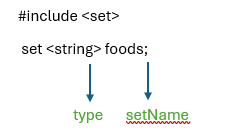
Create / Add/ Remove Data in Set
If you want to add datas at the time of declaration, place them in a comma-separated list, inside curly braces {}
நீங்கள் அறிவிப்பின் போது தரவுகளைச் சேர்க்க விரும்பினால், அவற்றை வட்டமுள்ள அடெரிகைகளில் {} இடையே காமா கொண்டு பிரிக்கப்பட்ட பட்டியலில் வைக்கவும்
Example / உதாரணம்
#include <iostream>
#include <set>
using namespace std;
int main() {
// Create a set called foods that will store strings data type
set<string> foods = {“Vadai”, “Idly”, “Dosa”, “Poori”};
// Print set data’s
for (string food : foods) {
cout << food << “\n”;
}
return 0;
}
Output
Dosa
Idly
Poori
Vadai
To add data to a set, you can use the .insert() function
ஒரு தொகுதியில் தரவுகளைச் சேர்க்க, நீங்கள் .insert() செயல்பாட்டைப் பயன்படுத்தலாம்
To remove specific data from a set, you can use the .erase() function
ஒரு தொகுதியிலிருந்து குறிப்பிட்ட தரவுகளை நீக்க, நீங்கள் .erase() செயல்பாட்டைப் பயன்படுத்தலாம்
Example / உதாரணம்
#include <iostream>
#include <set>
using namespace std;
int main() {
// Create a set called foods that will store strings
set<string> foods = {“Idly”, “Vadai”, “Pongal”, “Dosa”};
// Add new datas
foods.insert(“Poori”);
foods.insert(“Kesari”);
foods.insert(“Puttu”);
foods.insert(“Dosa”);
// Print set datas
for (string food : foods) {
cout << food << “\n”;
}
cout << “After Add, now remove data from set” << “\n”;
foods.erase(“Dosa”);
foods.erase(“Puttu”);
// Print set datas
for (string food : foods) {
cout << food << “\n”;
}
return 0;
}
Output:
Dosa
Idly
Kesari
Pongal
Poori
Puttu
Vadai
After Add, now remove data from set
Idly
Kesari
Pongal
Poori
Vadai
Feature of set : Unique Data
Data’s in a set are unique, which means they cannot be duplicated or equal.
தொகுப்பு பண்புகள்: தனித்த தன்மை கொண்ட தரவு
தரவுகளின் தொகுப்பில் உள்ளவை தனித்துவமானவை, இதன் அர்த்தம் அவை நகலெடுக்கப்பட முடியாது அல்லது சமமாக இருக்க முடியாது.
Descending Order / இறங்கும் வரிசை
By default, the data’s in a set are sorted in ascending order. If you want the order to be descending, you can use the greater<type> functor inside the angle brackets
பொதுவாக, ஒரு தொகுப்பில் உள்ள தரவு ஏற்முகமான வரிசையில் வரிசைப்படுத்தப்பட்டிருக்கும். நீங்கள் வரிசையை குறைவுபடியாக மாற்ற விரும்பினால், கூண்டுக் கூளக்களில் greater<type> செயலிப்பயன்பாட்டை பயன்படுத்தலாம்.
Example / உதாரணம்
#include <iostream>
#include <set>
using namespace std;
int main() {
// Create a set called foods that will store strings
set<string> foods = {“Idly”, “Vadai”, “Pongal”, “Dosa”};
// Print set datas
for (string food : foods) {
cout << food << “\n”;
}
cout << “After ascending, now displaying set data in reverse” << “\n”;
set<string, greater<string>> revfoods = {“Idly”, “Vadai”, “Pongal”, “Dosa”};
// Print set datas
for (string food : revfoods) {
cout << food << “\n”;
}
return 0;
}
Output :
Dosa
Idly
Pongal
Vadai
After ascending, now displaying set data in reverse
Vadai
Pongal
Idly
Dosa