C++ Maps
A map stores data’s in “key/value” pairs.
ஒரு வரைபடம் தரவை “கீ/மதிப்பு” ஜோடிகளில் சேமிக்கிறது.
Data’s in a map are:
Accessible by keys (not index), and each key is unique.
Automatically sorted in ascending order by their keys.
வரைபடத்தில் உள்ள தரவுகள்:
தெரிகளை (கீஸ்) மூலம் அணுகத்தெரிகின்றன (இண்டெக்ஸ் மூலம் அல்ல), மற்றும் ஒவ்வொரு கீலும் தனித்துவமானது.
அதிகரிக்கும் வரிசையில் தானாகவே தங்கள் கீஸ் மூலம் வரிசைப்படுத்தப்படும்.
Syntax
// Include the map library
Create / Add / Remove Data in Map
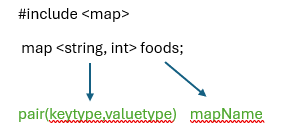
To create a map, use the map keyword, and specify the type of both the key and the value it should store within angle brackets <> like map<keytype, valuetype> mapName
To add data’s to a map, it is ok to use square brackets [] or .insert() function.
To remove specific data from a map, you can use the .erase() function
வரைப்படத்தில் தரவை உருவாக்கவும் / சேர்க்கவும் / அகற்றவும்
ஒரு வரைப்பட்டியலை உருவாக்க, map என்ற keyword-ஐ பயன்படுத்தவும், <keytype, valuetype> போன்ற மூலைக்கோணக் குறிகளுக்குள் அதைச் சேமிக்கும் key மற்றும் value வகையையும் குறிப்பிடவும், மற்றும் mapName குறிப்பிடவும்.
வரையறுக்கப்பட்ட தரவுகளை வரைபடத்தில் சேர்க்க கால் செய்ய, சதுரக் கோடிகள் [] அல்லது .insert() செயல்பாட்டைப் பயன்படுத்துவது சரி.
ஒரு வரைபடத்திலிருந்து குறிப்பிட்ட தரவுகளை அகற்ற, நீங்கள் .erase() செயல்பாட்டைப் பயன்படுத்தலாம்
Example / உதாரணம்
#include <iostream>
#include <map>
using namespace std;
int main() {
// Create a map called foods that will store qty ordered
map<string , int> foods = {{“Idly”,2}, {“Vadai”,1}, {“Pongal”,2}, {“Dosa”,1}};
// Add new datas
foods.insert({“Kesari”,1});
foods.insert({“Puttu”,1});
foods[“MasalaDosa”]= 1;
cout << foods.at(“Vadai”) << “\n”;
// Print map datas
for (auto food : foods) {
cout << food.first << ” ordered quantity is: ” << food.second << “\n”;
}
cout << “After Add, now remove data from map” << “\n”;
foods.erase(“Dosa”);
foods.erase(“Puttu”);
for (auto food : foods) {
cout << food.first << ” ordered quantity is: ” << food.second << “\n”;
}
return 0;
}
Output:
Dosa ordered quantity is: 1
Idly ordered quantity is: 2
Kesari ordered quantity is: 1
MasalaDosa ordered quantity is: 1
Pongal ordered quantity is: 2
Puttu ordered quantity is: 1
Vadai ordered quantity is: 1
After Add, now remove data from map
Idly ordered quantity is: 2
Kesari ordered quantity is: 1
MasalaDosa ordered quantity is: 1
Pongal ordered quantity is: 2
Vadai ordered quantity is: 1
Note: The .at() function is often preferred over square brackets [] because it throws an error message if the element does not exist
குறிப்பு: .at() செயல்பாடு பெரும்பாலும் செவ்வகம் [] பதிலாக விரும்பப்படுகிறது, ஏனெனில் அது உருப்படி இல்லாவிட்டால் பிழை செய்தியை உருவாக்குகிறது
Example / உதாரணம்
#include <iostream>
#include <map>
using namespace std;
int main() {
// Create a map called foods that will store qty ordered
map<string , int> foods = {{“Idly”,2}, {“Vadai”,1}, {“Pongal”,2}, {“Dosa”,1}};
// Add new datas
foods.insert({“Kesari”,1});
foods.insert({“Puttu”,1});
foods[“MasalaDosa”]= 1;
//cout << foods[“Juice”] << “\n”;
cout << foods.at(“Juice”) << “\n”;
// Print map datas
for (auto food : foods) {
cout << food.first << ” ordered quantity is: ” << food.second << “\n”;
}
cout << “After Add, now remove data from map” << “\n”;
foods.erase(“Dosa”);
foods.erase(“Puttu”);
for (auto food : foods) {
cout << food.first << ” ordered quantity is: ” << food.second << “\n”;
}
return 0;
}
Output:
terminate called after throwing an instance of ‘std::out_of_range’
what(): map::at